Personalized Christmas Card:
Ideas To Make Christmas Cards
& Unique Christmas Photo Cards
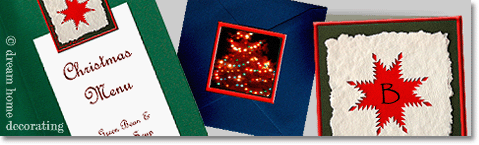
A personalized Christmas card is easy to design with these Christmas card photo ideas.
Download the instructions, print the Christmas card
elements and create your own, unique photo Christmas cards!
And don't stop at personalized Christmas cards, either. Create customized
- thank-you notes,
- Christmas dinner party invites,
- menu cards,
- or gift tags for your Christmas presents!

The unique Christmas photo cards on this page consist of four elements, which can be adapted and personalized with your own photos:
- a folded card
- a 'clasp'/gift tag
- a paper insert
- a 'seal' for the back of the envelope.
a) What you need & how to make unique Christmas photo cards
b) Free download: design your own Christmas cards!
c) Check out more Christmas card design ideas
What You Need & How To Make
Your Own Unique Christmas Photo Cards
If you want to use my design to create your own custom Christmas cards, you will need:
- Blank, colored card(s) (matching envelopes optional)
- Access to a good color printer
- Matte inkjet photo paper (at least 170g/sq. m.)
- Regular letter-size (or A4), office/business quality printer paper for the inserts
- Scissors or a craft knife and a self-healing cutting mat
- a (metal) ruler
- repositionable glue and
- permanent glue.
Download the instructions and use the design 'as is', or ...
... adapt it to your needs and tastes (you may need materials that aren't on the list).
The basic idea is to print your Christmas greetings
on a sheet of letter paper, fold & insert that into a card,
and use a gift tag like a 'peg' to close the card.
Download Instructions
You will need Adobe Reader (the latest version is recommended) installed on your computer in order to open and print the instruction (1) and the Christmas card elements (2 & 3). You can get Adobe Reader here (a new window will open so you can download it without leaving this page).
If you want to open the files in your browser window, just click on the links. However, if you want to download the files to view later, then right-click on the links and choose "Save Target As" or "Save File As". Then select where you want to save the file on your hard drive.
Once you have saved the file, locate where you saved it, and double click to open.
In order to print, open the downloaded file, and select the "Print" option from the menu. For best results, print the seals/clasps on a color printer where you can specify paper quality (e.g. 'matte photo paper') and print quality (choose the highest possible print quality).
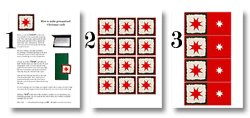
Right-click to download the Instructions (1).
Right-click to download the Seals (2).
And right-click to download the Clasp/Gift Tag (3) sheet.
One word of caution:
This is a copyrighted Christmas card design. You are not allowed to pass it off as your own, or to sell it (or any products you make from it). You are, however, extremely welcome, nay, invited to use it for as many of your own, personalized Christmas card greetings as you like :-)
Return to TopCustomize The Design:
Christmas Card Design Ideas
For
Unique Photo Christmas Cards
There are several ways in which you can adapt the basic idea of these personalized Christmas cards.
For example, instead of an insert with a Christmas greeting (click here for some Christmas quotes), you could write a friends-&-family newsletter with a special, personal paragraph added at the top for each recipient.
The most fun way, though, of turning the design into a personalized Christmas card
is by playing around with the clasp.
- One way to do this is to write the recipient's initial into the red star (with a fancy pen).
- Another is to make your own clasps: Cut them out of colored card and ...
- ... add your own pictures.
Here are a few ideas for making your own, unique Christmas photo cards:
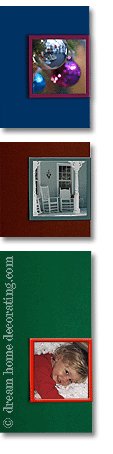
◊ A picture of your home at Christmas - use a
lovely detail, like a door wreath or the snow on your porch chairs,
or a detail of your Christmas tree.
◊ A photo of outdoor Christmas decorations - at your home, or down main street. Here, too, details look much more interesting and work better than a tiny photo of the whole decoration, house, or street.
◊ A color photocopy of a (kid's) Christmas drawing.
◊ Kids' handwriting - have one of the little ones in your family write "Merry" and "Christmas" with color crayons. Cut the words out, arrange one above the other and reduce in size on a color photocopier.
◊ You could take the idea of a personalized Christmas card even further, and give each recipient an individual picture on the clasp.
◊ If you're creating custom thank-you notes, use a fun picture of the person sending the thanks.
◊ If you're making menu cards, you could fix a menu insert to the inside of the card with the clasp, or with a 'seal' of your choice (see a photo of this at the top of this page, left).
Happy Crafting!
Return to Top- In addition to personalized Christmas card designs, try out some paper
Christmas
gift and handmade craft patterns, for example the
♦ Christmas paper houses,
♦ printable lanterns, or
♦ paper Christmas tree ornaments. - Also, check out the handmade Christmas tree decorating ideas!
- For more Christmas decorating ideas, look here!
Yet to find the information you're looking for? Type a word or phrase into the search box below:
Return from Personalized Christmas Card to Christmas Decorating Ideas
Return from Personalized Christmas Card to the Dream Home Decorating Homepage